API & developers
Document extraction in a few lines of code
Upload files from your ERP, app or scripts, then fetch the results or receive them by webhook. JSON in, JSON out.
- Step 01
Create a key
In Settings → API keys. Send it as Authorization: Bearer <key> or X-API-Key: <key>.
- Step 02
Upload
POST the file. You get the document id straight away; processing runs in the background.
- Step 03
Get results
Poll the document, or set a webhook URL to be told when it is completed or needs review.
01Upload
Send a document
document_type takes a type key (gst_invoice, bank_statement, purchase_order, grn, generic or your own) or auto to detect it. mode is smart for AI extraction or text for text and OCR only. Files can be PDF, PNG or JPEG, by default up to 25 MB and 200 pages.
curl -X POST https://api.peczaweb.com/v1/documents \
  -H "Authorization: Bearer $API_KEY" \
  -F file=@invoice.pdf \
  -F document_type=auto \
  -F mode=smart \
-F external_ref=ERP-1001import requests
API = "https://api.peczaweb.com"
API_KEY = "sk_live_..." # Settings → API keys
HEADERS = {"Authorization": f"Bearer {API_KEY}"}
with open("invoice.pdf", "rb") as f:
doc = requests.post(
f"{API}/v1/documents",
headers=HEADERS,
files={"file": f},
data={"document_type": "auto", "mode": "smart", "external_ref": "ERP-1001"},
).json()
print(doc["id"], doc["status"]) # queuedimport { readFile } from "node:fs/promises";
const API = "https://api.peczaweb.com";
const form = new FormData();
form.append("file", new Blob([await readFile("invoice.pdf")], { type: "application/pdf" }), "invoice.pdf");
form.append("document_type", "auto");
form.append("mode", "smart");
const res = await fetch(`${API}/v1/documents`, {
method: "POST",
headers: { Authorization: `Bearer ${process.env.API_KEY}` },
body: form,
});
const doc = await res.json();
console.log(doc.id, doc.status); // queued02Results
Fetch data, text or exports
Each document moves through these statuses:
| Status | Description |
|---|---|
| queued | Received and waiting to be processed. |
| processing | Being read and extracted. |
| completed | Done and approved, automatically or by a reviewer. |
| needs_review | Extracted, but a check failed or confidence was below the threshold. |
| failed | Could not be processed; see the error field. |
# Status and extracted data
curl -H "Authorization: Bearer $API_KEY" https://api.peczaweb.com/v1/documents/$DOC_ID

# Plain text (pages separated by a form feed)
curl -H "Authorization: Bearer $API_KEY" https://api.peczaweb.com/v1/documents/$DOC_ID/text

# Export as json | csv | xlsx
curl -H "Authorization: Bearer $API_KEY" \
"https://api.peczaweb.com/v1/documents/$DOC_ID/export?format=xlsx" -o invoice.xlsximport time
while doc["status"] in ("queued", "processing"):
time.sleep(2)
doc = requests.get(f"{API}/v1/documents/{doc['id']}", headers=HEADERS).json()
if doc["status"] in ("completed", "needs_review"):
print(doc["confidence"], doc["data"])
for issue in doc["validation"] or []:
print(issue["level"], issue["field"], issue["message"])
else:
print("Failed:", doc["error"]){
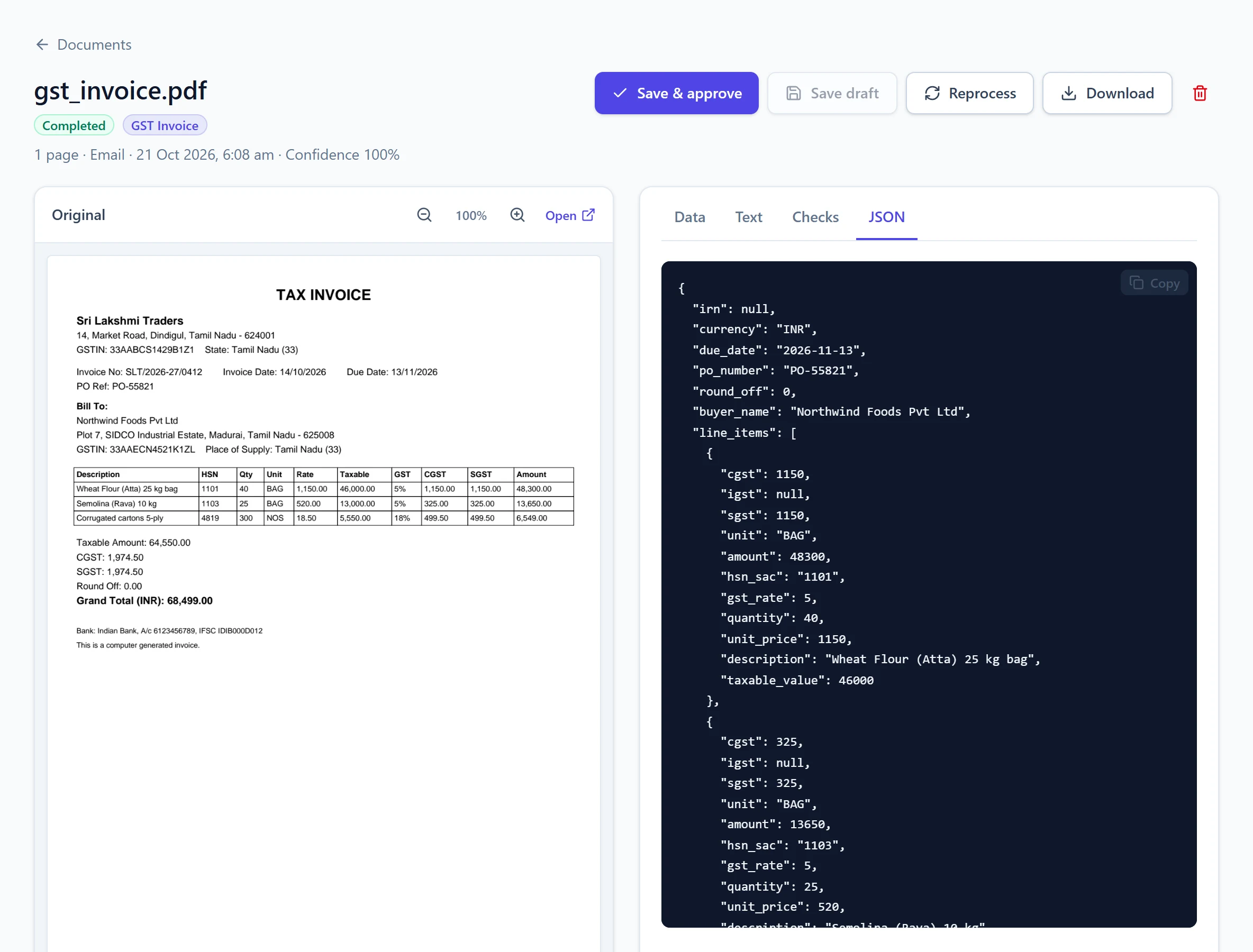
"id": "6f1c2d9e-…",
"status": "completed",
"mode": "smart",
"page_count": 1,
"document_type": { "id": "…", "key": "gst_invoice", "name": "GST Invoice" },
"confidence": 1.0,
"data": {
"invoice_number": "SLT/2026-27/0412",
"invoice_date": "2026-10-14",
"supplier_gstin": "33AABCS1429B1Z1",
"total_amount": 68499.0,
"line_items": [{ "description": "Wheat flour 25 kg", "hsn_sac": "1101", "amount": 48300.0 }]
},
"validation": [],
"external_ref": "ERP-1001"
}03Webhooks
Get told when documents are ready
Set a webhook URL in Settings → Webhooks. We POST document.completed, document.needs_review and document.failed events, with an HMAC-SHA256 signature of the raw body in X-Webhook-Signature. Failed deliveries are retried with back-off.
import hashlib, hmac

def is_valid(secret: str, raw_body: bytes, signature: str) -> bool:
    expected = "sha256=" + hmac.new(secret.encode(), raw_body, hashlib.sha256).hexdigest()
    return hmac.compare_digest(expected, signature)

# In your handler: is_valid(WEBHOOK_SECRET, request.body, request.headers["X-Webhook-Signature"])import crypto from "node:crypto";
export function isValid(secret, rawBody, signature) {
const expected = "sha256=" + crypto.createHmac("sha256", secret).update(rawBody).digest("hex");
return expected.length === signature.length &&
crypto.timingSafeEqual(Buffer.from(expected), Buffer.from(signature));
}POST https://your-app.example.com/hooks/documents
X-Webhook-Event: document.completed
X-Webhook-Signature: sha256=5d41…
{
"event": "document.completed",
"sent_at": "2026-10-21T09:30:12+00:00",
"document": { "id": "6f1c…", "status": "completed", "data": { … } }
}04Reference
Main endpoints
Full request and response schemas are in the interactive API reference.
| Endpoint | Description |
|---|---|
| POST /v1/documents | Upload a PDF, PNG or JPEG (multipart). Optional document_type, mode, external_ref. |
| GET /v1/documents | List documents; filter by status, document_type_id, source, q. |
| GET /v1/documents/:id | Status, extracted data, checks and confidence. |
| GET /v1/documents/:id/text | Extracted plain text. |
| GET /v1/documents/:id/export | Download as json, csv or xlsx. |
| POST /v1/documents/:id/reprocess | Run again, optionally with another document type or mode. |
| PUT /v1/documents/:id/review | Save corrected data; approve to complete it. |
| DELETE /v1/documents/:id | Delete the document and its file. |
| GET /v1/documents/export | Bulk Excel/CSV for one document type. |
| GET /v1/document-types | Your document types and their fields. |
| GET /v1/usage | Pages used this month and plan limits. |
Email providers can also deliver straight to the API: Postmark and Mailgun inbound webhooks are supported, in addition to the built-in mailbox.