Reads every page, even scans
Digital PDFs are read exactly from their text layer; scans and phone photos go through OCR, page by page.
PW products
Use one or all three. They share your login, team, branding and workflows, so a document can lead to a call or a WhatsApp message, and a call can update your records.
PDFs, scans and photos into checked data. GST invoices, bank statements, POs and GRNs, or your own types. Email inbox, WhatsApp, upload or REST API. Checks and a review queue, then workflows into Tally, your ERP or a sheet.
Voice agents for customer care and follow-ups. Speaks Tamil, English, Hindi, Telugu, Kannada and Malayalam. Answers your support line and works through outbound call lists. Transcript, summary and next action after every call.
Invoices, chats and alerts on WhatsApp and SMS. Suppliers send invoices on WhatsApp; they are read like your inbox. An AI agent answers chats, with hand-over to a shared inbox. Alerts, reminders and campaigns on your own number and SMS gateway.
01How it works
Every document follows the same path. People only step in when a check says they should.
Email inbox, drag-and-drop or REST API
Text layer or OCR, then AI fills your fields
GSTIN checksum, totals, balances, required fields
Only doubtful documents wait for a person
Excel, CSV, JSON or a signed webhook
02Product tour
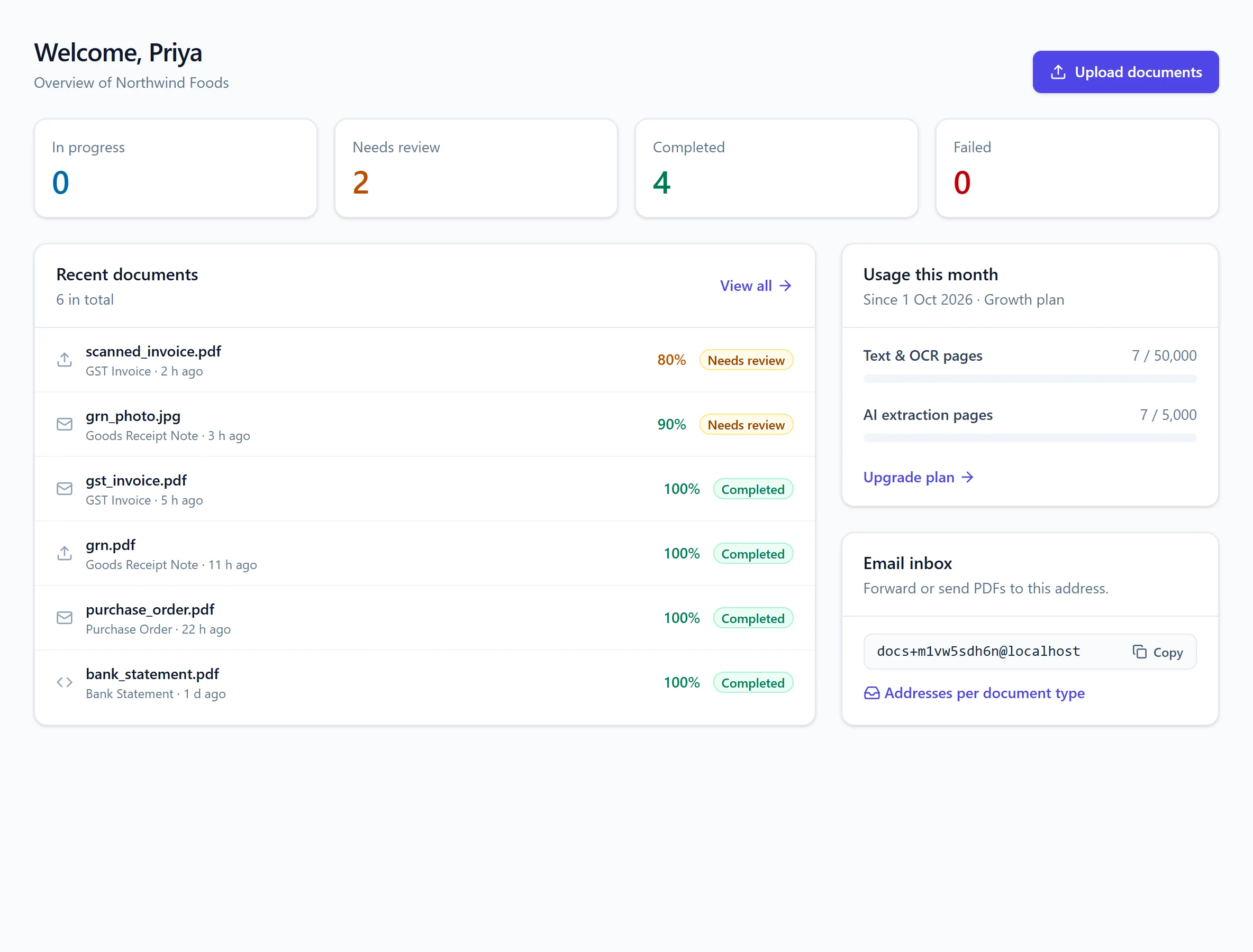
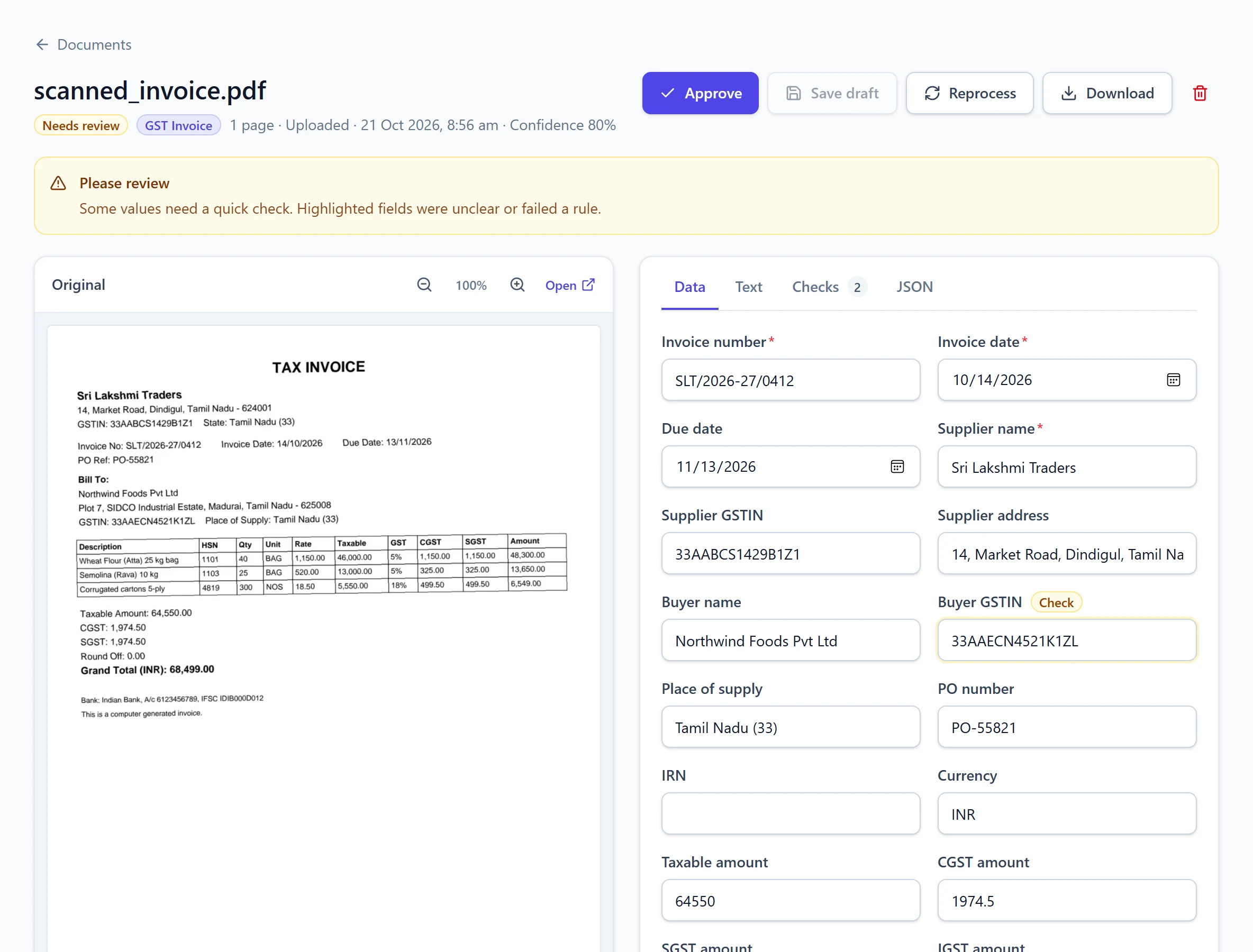
Screens from a live workspace: a scanned supplier invoice, a bank statement, document types, the inbox and the API.
Extracted fields sit next to the page image. Anything unclear is highlighted, so a reviewer fixes it in seconds and approves.
See which checks passed or failed, notes from the AI, the confidence score and how each page was read.
Multi-page statements become one clean table, with the running balance checked row by row.
Start from ready-made types or build your own: fields, tables, hints, an email alias and an auto-approve level.
Forward to your workspace address, or use an alias such as .invoices to skip detection entirely.
Named API keys, ready-to-copy examples, and signed webhooks when documents are done.
03Features
Capture, read, check, review and deliver — in one place, for your whole team.
Explore all featuresDigital PDFs are read exactly from their text layer; scans and phone photos go through OCR, page by page.
AI fills the fields each document type defines — tables of line items included — and always returns the same JSON shape.
GSTIN checksums, totals, tax splits and bank balances are verified automatically.
Approved reviews become private examples that guide similar documents next time.
Your system is told the moment a document is completed, needs review or fails.
Alongside English, so regional suppliers' documents are read too.
Forward emails as they arrive; aliases route documents to the right type.
Download one document, or a whole document type as a single workbook.
04Workflows
When a document is ready, send it on — to a Google Sheet, your database, Tally, Zoho Books, your ERP, Slack or any webhook. Build it on a visual canvas, with conditions for the exceptions. Explore workflows: 32 connectors · 14 ready templates.
05Learns from your team
When someone fixes a field and approves a document, it becomes a private example for your workspace. The next similar document — the same supplier's invoice, the same bank's statement — follows it.
This supplier prints the PO number in the footer, so it was missed. One edit, then Approve.
Saved privately in your workspace and linked to the GST Invoice type.
When this supplier's next invoice arrives, the closest examples guide extraction.
06Documents
Start with document types built for Indian businesses, then add your own.
Invoice number, GSTINs, HSN lines, CGST/SGST/IGST and totals.
Every transaction with date, narration, debit, credit and balance.
PO and goods receipt details ready for three-way matching.
Clean text from any PDF, scan or photo, page by page.
Define any document type and the fields you need — no code.
07New · Supplier onboarding
Send one link. Suppliers fill in their details and upload their KYC documents; everything is read and cross-checked before you approve. See supplier onboarding
08New · AI calling
Voice agents answer customer calls and make follow-up and sales calls in Tamil, English, Hindi, Telugu, Kannada and Malayalam. Every call ends with a transcript, a summary and the next action. See AI calling
09Three ways in
Use one channel or all three. Every document goes through the same checks and lands in the same place.
Read the API guideEach workspace gets its own address. Add an alias such as .invoices or .bank to skip auto-detection.
Drag in many files at once from the dashboard.
Post files from your ERP or app and get signed results back.
curl -X POST https://api.peczaweb.com/v1/documents \
  -H "Authorization: Bearer $API_KEY" \
  -F file=@invoice.pdf \
-F document_type=gst_invoiceimport requests
doc = requests.post(
"https://api.peczaweb.com/v1/documents",
headers={"Authorization": f"Bearer {API_KEY}"},
files={"file": open("invoice.pdf", "rb")},
data={"document_type": "gst_invoice"},
).json()
print(doc["id"], doc["status"]){
"id": "6f1c…",
"status": "completed",
"document_type": { "key": "gst_invoice", "name": "GST Invoice" },
"confidence": 1.0,
"data": {
"invoice_number": "SLT/2026-27/0412",
"supplier_gstin": "33AABCS1429B1Z1",
"total_amount": 68499.0,
"line_items": [ … ]
},
"validation": []
}10FAQ
PDFs (with or without a text layer), PNG and JPEG images such as phone photos. By default each file can be up to 25 MB and 200 pages.
Yes. PW uses the PDF's own text where it exists and runs OCR on pages that are scanned or photographed. OCR supports English, Hindi and Tamil.
It depends on the document quality, so every result is checked. Each document gets a confidence score from the business-rule checks; anything below your threshold, or with a failed check, goes to the review queue instead of straight to your systems. Corrections you approve are used as examples for similar documents.
Yes. Create a document type, list the fields you need (including tables), and optionally give it an email alias. No coding is needed.
With a workflow. Tally, Zoho Books and QuickBooks have their own steps, and ERP connectors for SAP S/4HANA, SAP Business One, Microsoft Dynamics 365, Oracle NetSuite, Odoo and ERPNext post supplier invoices against the purchase order, saved for review by default. These connectors are in beta. For any other system, export Excel or CSV, or use the REST API and webhooks.
The second product on the platform: AI voice agents that answer customer calls and place follow-up and sales calls in Tamil, English, Hindi, Telugu, Kannada and Malayalam, on your own Exotel numbers. During a call the agent can look up orders, raise tickets, book appointments or transfer to your team; afterwards you get the transcript, a summary, the outcome and the next action.
Every processed page counts as a text page (text layer or OCR). Pages that also go through AI field extraction count as AI extraction pages. Plans include a monthly allowance of each.